


SiteFarm lets you create a new revision every time your content is updated. This allows you to track how the content has changed over time on your site.
How to use Revisions
- Select the content you want to update and Edit it.
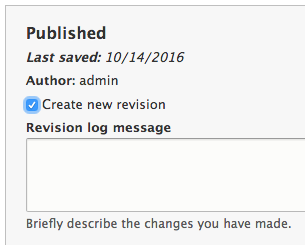
- On the right side in the Additional Options section, you will see a Revision log message field where it is a good idea to add a meaningful Log message whenever you create a node revision, so that others (or you, months later) can see why you changed the page and what your changes were, without having to actually view the previous revision.
Viewing and Managing Revisions
Until such time as a revision point is added, this feature will not be available.
- To view and manage revisions, use the Revisions tab when viewing your content.
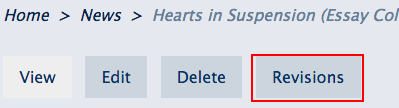
- From the Revisions tab, you can view the individual revisions, revert to an earlier revision, and delete revisions (you must have the "administer nodes" or "revert revisions" and "delete revisions" permissions).
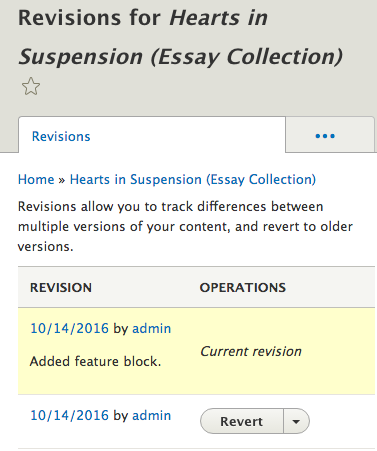
- You'll be able to choose an earlier Revert point and click its button.
- The next screen will confirm you truly want to revert to the earlier point and give you a chance to Revert or Cancel before the action is taken.
How does this work?
One interesting detail of the system is the behavior of the reversion mechanism. Let's say you have revisions {1, 2, 3, current}. If you revert to revision #2, a copy of #2 is made and the copy is set as the current revision. Thus, after reverting you'll have {1, 2, 3, 4, current}, where current is a clone of #2, and #4 is the previous current revision.
You can preview any previous save point in the Revisions tab by clicking on its date link.
Revision Limits
- Old revisions will be automatically deleted if they are over 12 months old AND there are more than 20 revisions of that piece of content. Here are some examples:
- An Article has 50 revisions, but they were all made within the past 12 months. All 50 revisions will be kept.
- An Event has 10 revisions made over the past 3 years. All 10 revisions will be kept.
- A Basic Page has 25 revisions of which 5 were made 24 months ago, 5 were made 18 months ago, and the remaining 15 were made less than 12 months ago. Only the 5 revisions made 24 months ago will be deleted, and the remaining 20 revisions will be kept.